
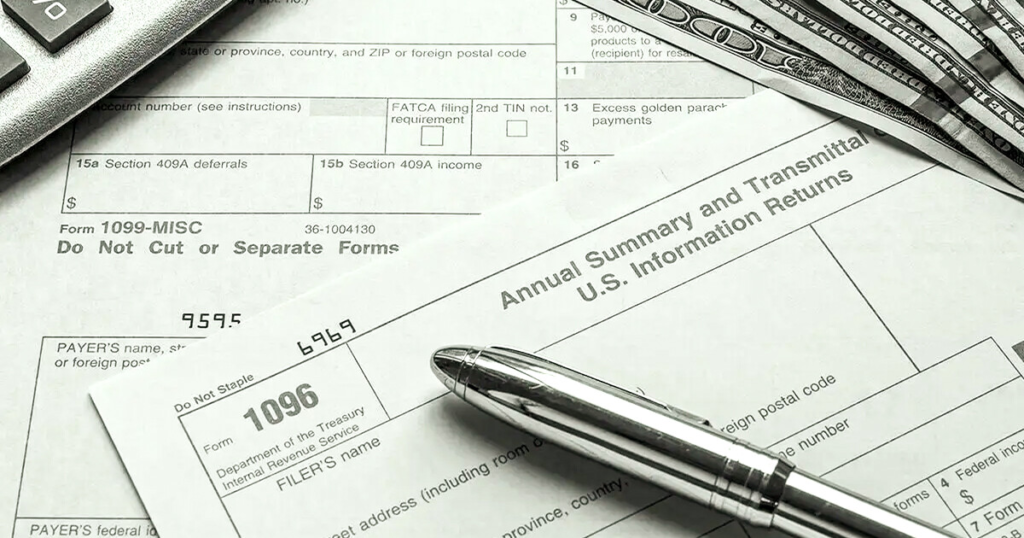
Tax season is filled with checklists and deadlines. Employers not only prepare 1099s but also need to submit a lesser-known form before mailing anything to the IRS: Form 1096. This single-page transmittal form summarizes information returns and ensures the IRS processes them correctly. Our payroll processing services help businesses streamline compliance and reduce stress during tax season. With expert support, you can avoid costly mistakes and meet every filing deadline with confidence. We make sure your forms are accurate, organized, and IRS-ready the first time.
What is IRS Form 1096?
Form 1096, officially titled the Annual Summary and Transmittal of U.S. Information Returns, is a one-page form used when submitting paper copies of certain tax forms to the IRS. Employers use it as a summary sheet for forms like:
- Form 1097 – Bond Tax Credit.
- Form 1098 – Mortgage Interest Statement.
- Form 1099 – Including NEC, MISC, and INT.
- Form 3921 & 3922 – Stock Options and Transfers.
- Form 5498 – IRA Contributions.
- Form W-2G – Gambling Winnings.
If you file electronically through the IRS FIRE system, you don’t need to submit Form 1096. It’s required only for paper filings. Each type of return must be sent with its own separate Form 1096, meaning you’ll file multiple 1096s if you’re submitting different return types. This form acts as a cover sheet, helping the IRS track totals and ensuring your information returns are properly organized.
Who Needs to File Form 1096?
You’ll need to file Form 1096 if:
- You’re mailing paper copies of 1099s or other information returns.
- You have fewer than 250 returns (above that, the IRS requires e-filing).
- You’re submitting multiple return types (each one requires its own 1096).
Example: If you’re mailing 20 contractor 1099-NECs and 10 landlord 1099-MISCs, you’ll need two separate 1096 forms. This requirement helps the IRS correctly categorize your filings and match the totals to the right type of return.
What’s Included in Form 1096?
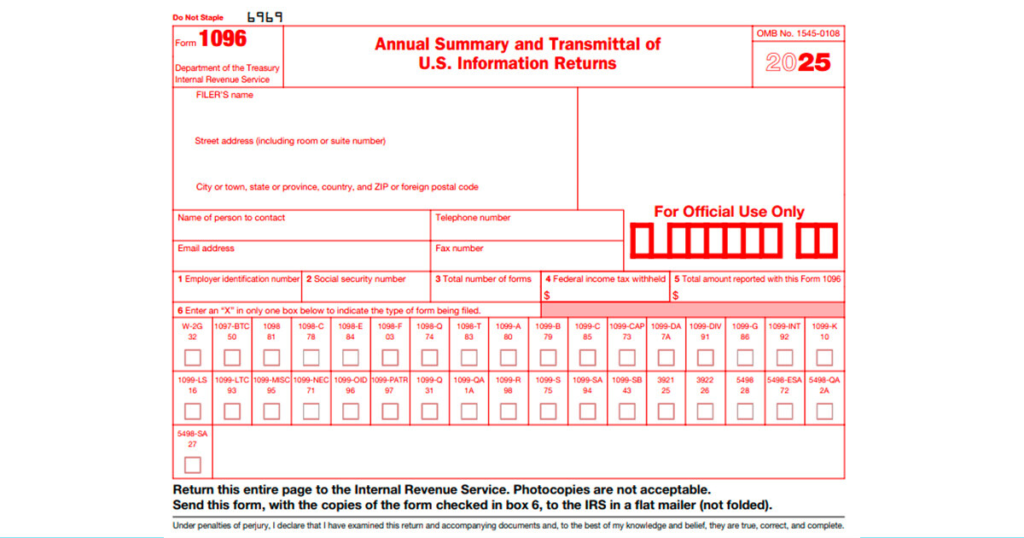
Form 1096 is simple but important; it provides the IRS with a quick snapshot of the information returns you’re submitting. Employers need to make sure every field is accurate before mailing. The form asks for:
- Your business name, address, and EIN/SSN: This identifies the filer and ensures the IRS records are tied to the correct business.
- Total number of forms attached: Count all the information returns (like 1099s) being summarized by this 1096.
- Total dollar amount reported: Add up the total payments listed across all attached forms.
- Any federal tax withheld: If taxes were withheld from payments, include the combined total here.
- A checkbox showing which form type is being summarized: Each 1096 can only summarize one form type, so you must check the correct box (e.g., 1099-NEC or 1099-MISC).
Since Form 1096 acts as a cover sheet, even small errors can cause the IRS to reject your submission. Double-checking totals and making sure you’re using the correct version of the form is essential.
How to Fill Out IRS Form 1096
To ensure your Form 1096 is completed correctly, follow these steps:
- Enter filer details: Fill in your business name, address, and contact information.
- Provide identification: Use your Employer Identification Number (EIN) or, if not available, your Social Security Number (SSN).
- Report number of forms: State the total number of information returns attached to this 1096.
- List federal tax withheld: Enter the total amount withheld, or “0” if none.
- Add total reported payments: Sum all dollar amounts reported across the attached forms.
- Select form type: Check the box for the specific return being summarized (e.g., 1099-NEC, 1099-MISC). Remember, each return type needs its own 1096.
- Mail to the IRS: Place Form 1096 on top of your stack of returns and send it to the IRS service center listed in the official instructions.
Note: Only the official red-ink scannable version of Form 1096 is accepted. Photocopies or PDFs are not valid.
How to File IRS Form 1096
Once you’ve completed Form 1096, the next step is submitting it correctly. Where you send it depends on your business’s location, so accuracy here is just as important as filling out the form itself.
- Mailing requirement: Form 1096 must be mailed to the IRS along with Copy A of all the information return forms it summarizes (such as 1099-NEC, 1099-MISC, or 1099-INT).
- Regional IRS centers: The IRS processes returns through regional service centers. Your business’s main address determines which IRS office you’ll need to mail your documents to.
- Official address list: You can find the complete and updated list of mailing addresses in the IRS’s official instructions for Form 1096.
- Filing tip: Always place Form 1096 on top of the stack of returns you’re submitting. Remember, each type of information return (like 1099-NEC vs. 1099-MISC) requires its own separate Form 1096.
- Use the correct form: The IRS only accepts the original red-ink, scannable Form 1096. Digital printouts or photocopies are not valid.
When Is Form 1096 Due?
Like most tax documents, Form 1096 comes with strict deadlines, and missing them can result in costly penalties. If you’re filing paper copies of your information returns, such as 1099s, Form 1096 must be submitted by February 28 following the end of the tax year. For electronic filings submitted through the IRS FIRE system, you don’t need Form 1096, but your electronic returns are due by March 31. Certain forms summarized by Form 1096 may also carry different deadlines; for instance, Form 5498 (IRA contributions) is due by June 1, while others can be due as early as January. The key is to always review the IRS’s General Instructions for Certain Information Returns to confirm your specific due date.
What Happens If You Don’t File Form 1096?
Failure to file Form 1096, or filing it late, can result in steep penalties:
- Up to 30 days late → $50 per form
- 31 days late through Aug 1 → $110 per form
- After Aug 1 or never filed → $280 per form
- Intentional disregard → $570 per form
These penalties apply per form, so missing multiple 1099s can add up fast.
How to Make Corrections to Form 1096
Mistakes happen, but correcting them properly is important. There are two main scenarios:
- If the mistake is on the information returns (like 1099-NEC or 1099-MISC): Send a corrected copy to the recipient, prepare a corrected version of the form marked “Corrected,” and file a new Form 1096 summarizing only the corrected returns.
- If the mistake is on Form 1096 itself: File a corrected Form 1096 with the right details and attach a brief explanation if needed.
Remember, Form 1096 corrections must be mailed on official scannable IRS forms; no electronic filing or photocopies are allowed.
Payroll Processing with MadTax: Simplifying Compliance
Form 1096 may be a single sheet, but it plays a critical role in ensuring your IRS filings are complete. Missing or incorrect submissions can lead to costly penalties.
That’s why The MadTax offers comprehensive Payroll Processing solutions. From preparing 1099s to managing deadlines and ensuring accurate filings, our team handles the details so employers can focus on running their business, not wrestling with IRS paperwork.
MadTax, Payroll Processing made simple, accurate, and stress-free. With 24/7 expert support and seamless integrations, we keep your payroll and tax obligations on track.